

I’ve dist-upgraded my AMD64 Kubuntu Linux installation from 5.10 Breezy to 6.04 Dapper Drake (even if the latter is still Beta). I had to solve some small issues but I suppose that this is what happens when one uses Beta versions :-)
- Dynamically loaded firmware (for example, firmware for my USB Alcatel Speedtouch modem) MUST be placed in /lib/firmware/{kernelversion}/ instead of /lib/hotplug/firmware/ as was the case in 5.10
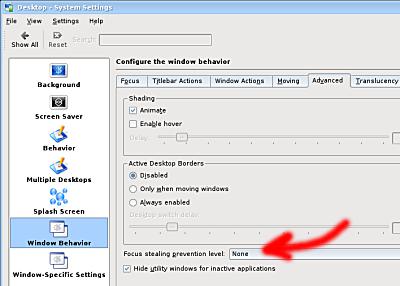
- The default configuration of KDE is not nice at all : new windows do not automatically get the focus. For example, pressing Alt-F2 to bring the “Run Command” window does not allow you to type a command right away because of the lack of focus. Solving the problem is easy, just change the “Focus stealing prevention level” from Low to none as shown here :
- When logging in KDE, the splash screen was not displayed properly because a required package (ksplash-engine-moodin) was not installed (I had to do it manually)
- This is not a bug but a feature it seems to me :-) NTP (client) is not installed by default. I need to find out why.
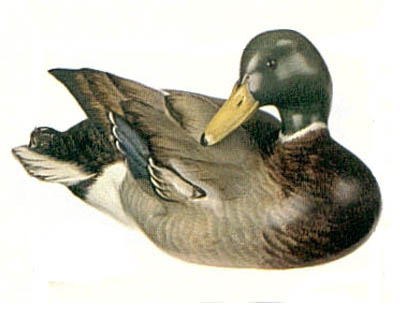
By the way, a drake is a male duck :
Hello,
I am totally a newbie using Kubuntu 5.10, Plese inform:
– How to dist-upgrade ? Is it O.K. with changing the source list and then sudo apt-get and sudo dist-upgrade ?
– I am using Speedtouch USB ADSL Modem 330 silver and this firmware:
speedtouch-firmware_0.3012k_all.deb
Did you use the same one and if so did you re-install the firmware after upgrade to Dapper ?
Hello,
I am a newbie using Kubuntu 5.10
Please inform
– How did you dist-upgrade ? Is it O.K. by changing the source list and then apt-get update and apt-get dist-upgrade ?
– I am using Speedtouch USB ADSL Modem. Did you use the same firmare as I do i.e. speedtouch-firmware_0.3012k_all.deb ?
– If so did you re-install the firmware after dist-upgrade ?
Thanks
Sorry, I did not notice your comment…
To dist-upgrade to Dapper, I only changed all breezy references to dapper in sources.list and issued
sudo aptitude update
sudo aptitude dist-upgrade
(PS: Use aptitude instead of apt-get, it’s better because it automatically removes unused packages when you manually remove a package)
I’m also using a Speedtouch USB modem. And the only thing I needed to do to get it to work was to copy the firmware (called speedtch-1.bin and speedtch-2.bin) to
/lib/firmware/