
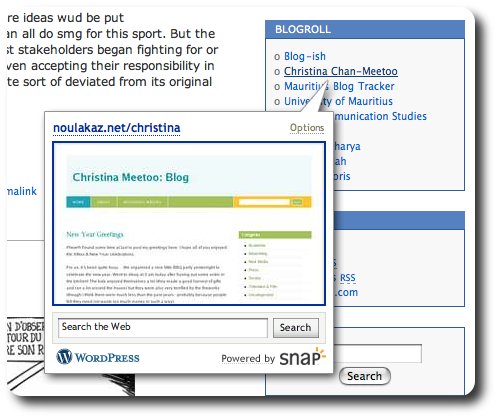
Disable Snap Preview Anywhere

As said by Rafe Colburn:

“Today I was reading [an] article, which “helpfully” offers thumbnails of the pages each link points to, powered by Snap. I guess this is supposed to provide value to users, but it doesn’t. It’s just harassment.”

But as Ryan Tomayko found out, it’s easy to disable (and to enable if already disabled) Snap Preview Anywhere globally (i.e. for all websites you visit). As a convenience, I’ve provided a disable (and an enable) button that you can just click and reach Snap-free nirvana:

Please note, you must refresh the affected pages or clear your cache for these changes to take effect.

  • Share/Bookmark

About avinash

I am the Managing-Director of Knowledge Seven Ltd, provider of quality consultancy, support and training for open source software. I am also an amateur photographer and musician. I use a Google Nexus One Android smartphone, an Apple MacBook, Mac OS X, Linux and a lot of open source software. I am married to Christina and we have two wonderful kids, Kyan & Anya. In case you are wondering, Noulakaz means "our home" in my native language, créole.
This entry was posted in Technology. Bookmark the permalink.

One Response to Disable Snap Preview Anywhere

  1. Hans says:

    wow! thanks so much for that. For sure, those snap previews are kinda annoying….

Leave a Reply

Your email address will not be published. Required fields are marked *

*

You may use these HTML tags and attributes: <a href="" title=""> <abbr title=""> <acronym title=""> <b> <blockquote cite=""> <cite> <code> <del datetime=""> <em> <i> <q cite=""> <strike> <strong>

CommentLuv Enabled