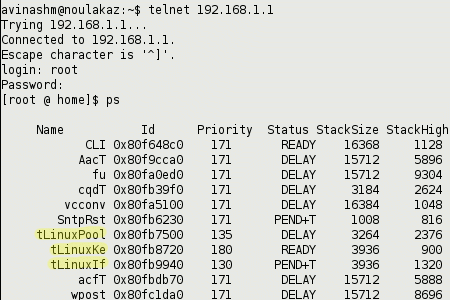
…as if I expected it to run some other operating system ;-)
Read this for a (partial) description of all available user commands (accessible from a Telnet session).
Disclaimer: use your brain!

Noulakaz
The blog of Avinash, Christina, Anya and Kyan Meetoo.
…as if I expected it to run some other operating system ;-)
Read this for a (partial) description of all available user commands (accessible from a Telnet session).
Disclaimer: use your brain!
hey avinash…
was immensely grateful to visit your blog regarding installing the wifi dongle on Linux. I have just started using linux, and am a total novice. could you (in absolutely baby language!) explain the how to of the installation? ( i have a ubuntu 6.06LTS)running on my P4 laptop. THE myT guys were working for the better part of the afternoon today, and the wifi on my win XP partition is running fine. the set top box is the pits though! it has as yet been unable to locate a single free channel (i have been asked to change my TV antenna!)
thanks in anticipation.
Please read this and if you follow the steps correctly, your Sagem Wifi dongle will work in Linux!
hi, i am actually using suse 10.2, live box was working fine, till the day when i got a power cut, then eventually i can no longer connect to the net.
theres no problem with the live box cuz my laptop running ze xp os can access the net. i dnt kno wat to do. can you help me? plzz thnks
Hi Ilitch,
Do you connect to the Livebox using Wifi or Ethernet? You have not been very explicit. Please give us some more information about the problem you are having.
hi thnks for the reply, sorry if i hav been long, ok here we go, my linux box is connected to the live box via the ethernet port, i cant get acess to the net. beside i always wanted to know how to wine games running on windows, btw happy new year
one more thing do you know how to use hamachi, to play cs and fifa on a fat 32 box
Just configure Linux to get an IP address (i.e. it should be a DHCP client) from the Livebox and everything should be ok.
(In case, this does not work, try to manually assign an IP address to the Linux box. 192.168.1.250/255.255.255.0 should work. Don’t forget to indicate that 192.168.1.1 should be the gateway and the DNS server)
I don’t know anything about Wine and Hamachi though :-)
lol.. u r wine-ing cs?? Use the linux installer… Google “counter strike linux”…
linux
amazing software
been a while i haven’t had a go at one of the newer ones
what can i say
i prefer the old ones
however it’s more about function over form
but god i hate that stupid livebox, im going to start looking for a proper box that can handle some f@#king around.
Hey Bann Kamwad
I intend to install Linux on a second partition of my PC (pu badinn in pe). What version would you people advise as best? How about Ubuntu? Thx
Ubuntu is an excellent choice as (more or less) everything works out of the box. Kubuntu (which is Ubuntu with the KDE desktop environment) is also an excellent choice and is the distro which I personally use.
Hello,
im on myt and i was wondering if the TNT decoder, besides tv channels, is just for picking movies off MT’s servers or is there a way of picking movies on the pc’s hard drive too? just wondering…
Hi Deven,
Unfortunately, you can’t do that with the MyT devices. If you really want to play your PC stuff, the simplest thing is to use your TV out on your graphics card (most have those) and run a cable to your TV. It’s not very nice to look at but it works… cheaply.
There is also the possibility of buying a specific device that does this through the network i.e. wirelessly in 2008. I personally use an AppleTV in my wife’s Mediacom Studio with excellent results. I know that D-Link also does things like this.
Hi there!
My set top box (decoder) got faulty and I had MT replace it. They gave me another model with a USB port in the front. I’m wondering what that might be used for…
Any idea about that please?
Hi there!! I have one question….
Well, we know that MT uses what it (unjustly) calls ‘fair usage policy’. Now, MT says that if you have donloaded like 10GB in one month, then you lose your priority on their network, and subsequently your bandwidth is reduced. In fact, that happened to me since yesterday. Instead of having my 30-32KBps, I’m having only
So, is there any way to reset the counter??
MY computer Eee 1000 linux, It took me while to connect but it is connect to livebox wirelesss:
visit: http://www.linuxquestions.org/questions/showthread.php?p=3970402#post3970402
hope this helps
Thanks Victor. I’m sure that will be very helpful to some…