
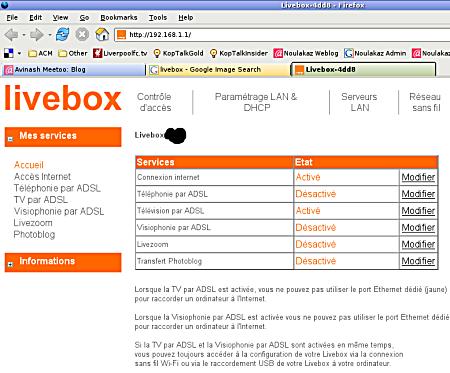
Yep! The Mauritius Telecom guys came to my house today to install the Livebox… Here are my first impressions:
- Video on demand: Nice selection of films but the image quality is slightly worse than Parabole Maurice (and dreadful compared to DVD).
- TNT: 6 free channels and I think I’ll only regularly watch BBC World.
- ADSL: Fantastic! I’m now surfing at 256kbit/s when accessing sites outside Mauritius (and at 2Mbit/s inside Mauritius).
- Voice over IP: Not activated yet…
- Wi-Fi: I’m over the moon… I’ve tested the wireless connection using a laptop (a Centrino-based Dell Inspiron 9300) and the signal strenght is excellent even if I’m in another room. I have also done a test from my desktop computer using a Sagem XG760N USB Wi-Fi adapter which is also freely given by Telecom Plus as part of the Livebox offer and I’m satisfied even though the signal strength is much lower compared to the laptop.
Installing the Sagem XG760N USB Wi-Fi adapter in Kubuntu/Ubuntu Linux
The Sagem XG760N USB Wi-Fi adapter comes with a CD-ROM containing Windows drivers. But, for once, a Linux driver is readily available and is not too difficult to install. The adapter, in fact, is a rebranded ZyDAS device with contains a ZD1211 chipset. ZyDAS has an opensource driver and some nice guys have enhanced it. The latest version is currently Release 83.
Here are the steps to follow:
- Make sure your compiler and headers are correctly installed. The simplest way to do this is to run:
sudo aptitude install linux-headers-`uname -r`
sudo aptitude install build-essential - Download the driver and uncompress it somewhere
- Replace the Makefile by this one
- make
- sudo make install
and a kernel module called zd1211b will be installed in /lib/modules/
Add this (for example using sudo vi/gedit/kate) to /etc/network/interfaces:
auto wlan0
iface wlan0 inet dhcp
pre-up modprobe zd1211b
post-down rmmod zd1211b
wireless-mode Managed
wireless-key restricted xxxxxxxxxxxxxxxxxxxxxxxxxx
… and you’re done! Wi-Fi rules ;-)
19 July : an update
Yesterday, when I returned home from work, I noticed that my set-top box was not working anymore (so no Video on Demand and no TNT until the problem is solved). According to me, the external power transformer has died and need to be replaced. I’ve had to call the My.T hotline four times before I managed to convince them that a technician needs to come to my house to solve the problem :-(
Please note that the Livebox is still working (so Wi-Fi still rules ;-) ) but I’ve noticed that instead of having a (more or less) sustained rate of 256kbit/s when downloading something from a server outside Mauritius, the rate varies from 40 to around 200kbit/s and this is so painful… The technician (who will normally come tomorrow) will also look into this…
So what do you think of the navigation, the GUI? Any problems encountered? ;-)
I bought a one-year subscription to Nomad for a relative. I am now pinching myself for not waiting a bit longer. This is a very interesting package deal.
BTW, from the screenshot it appears that you cannot use TV/VoIP and Internet at the same time. Is that the case?
Hi Asvin,
The GUI is nice. It’s not too difficult to use. But it is somewhat slow… and sometimes I find myself pressing on the OK button of the remote twice or even three times.
There is a big issue for those with Parabole Maurice: the MyT set-top box comes with a remote control with uses the same frequency as the Parabole Maurice remote and there are some interference. For instance, switching on my set-top box also switches on my Parabole Maurice decoder. This is bound to disturb a lot of people…
Eddy,
This is really a good deal (Wi-Fi is sooooo nice) except for the 1Gb transfer limit… The Livebox can technically handle TV / VoIP / Internet (Ethernet / Wi-Fi) at the same time but, for the time being, VoIP is not offered by Mauritius Telecom…
I do not doubt the attractiveness of this package. It will certainly suit all the casual Internet users who are mostly interested in having a more decent TV offering than that from the MBC and want an always-on Internet connectiion. For these people, the 1GB limit will not be much of an issue.
As for the lack of a VoIP service, I don’t suppose this is such a limitation as there are so many alternatives to choose from (Skype, Gizmo, etc.)
And yes, WiFi is great. Surfing the web from the couch and immediately accessing additional information on matters being discussed on TV is very useful.
Eddy
You lucky devil :-).
Well I’m a third class citizen because I live in a village and according to MT I wouldn’t be interested with this until end of year :-(. Grrrr
To Eddy:
I agree. For most people, the offer is just fantastic. 1Gb is good enough… for those who don’t download a lot. And, as you mentioned, Wi-Fi is heaven!
To Raj:
Vine reste Quatre-Bornes ;-) More seriously, you’ll only have to wait for some months until the offer is extended to the whole island…
hehe so bloody nerds in mu didnt know that, nice to see heheh
anything new there keep in touch avinash and ashvin per :)
hi avinash,
i tried installing the zd1211 driver for the sifi dongle supplied by mauritius telecom on my ubuntu 6.06, but after the make install (al steps as enumerated by you upto this point have been diligently followed), i get the response error install, permission denied.
can you advice please?
Thanks for pointing this out.
You must type “sudo make install” to install the kernel module.
Furthermore, to edit /etc/network/interfaces, you must also have admin privileges hence:
sudo gedit /etc/network/interfaces (if you use Gnome)
or
sudo kate /etc/network/interfaces (if you use KDE)
and reboot your computer for Wifi glory! Don’t forget to use your actual WEP key (it’s written below the Livebox)!
Hi avinash..
thanks a ton for all the advice… but i am not yet wi fi!
all the software appears to be correctly installed, and i get a wlan0 connection in the network connections admin tool, but no connection!
I have fed in the wep key correctly. is the key type hex or ascii? any other options that i have to change?
thanks. nikhil.
The key is Hex (as far as I remember)
Tell me, you have pressed the Association button on your Livebox (so that it allows the connection from the Wifi dongle), isn’t it?
Hi there,
Could anyone help me about using my livebox by ethernet on linux fedora core 5.i didnt install the linux yet,im completely new to the linux world.
Thanks
And still you call yourself a hardcoreboss :-)
Connecting the Livebox to your Linux box is easy as the former features a DHCP server (i.e. it can automatically configure the network parameters of the Linux box).
Just make sure that you have selected DHCP in Linux (using the RedHat Network Admin tool).
Hi avinash…
sorry, was out fo a long time, and only just saw your reply…
basic question… where the heck is the association button? there are no buttons on the top or sides, and only two tiny black peg like buttons at the base (actually 3, including one labelled RST .. which i take to be the reset button)
hi Nikhil,
It’s the one marked REG. It’s next to the power jack. Press it and the Wifi LED will blink for 5 minutes. During this period, reboot your Linux box and it should REGister with the Livebox.
Hi avinash!
Finally WIFI RULES!
I owe you at least a beer! thanks for all the help.
nikhil
Great!
I won’t mind a good Phoenix and a nice gajack to accompany it ;-)
hello avinash
i am searching a driver for the livebox of mt but is unable to get one
can u help
Ash,
What exactly are you looking for?
The Livebox does not require a driver to be recognised as it uses open standards. And if you are speaking of the Wifi dongle, please read the post.
Does anyone know whether P2P is filtered on the MyT package?
i installed kubuntu on my old PC (P3)…and made a USB connection with my MyT. What must i do now to get access to the internet. I have decided to get accustomed to Linux as from now.
Hi Vikram:
I would advise you to forget about the USB connection. Use the Ethernet port instead. It’s much easier (basically you don’t have anything to install. You only have to configure your Linux computer to get a network address using DHCP)
If your computer has an Ethernet port (RJ-45) then you only need a crossed cable (available everywhere e.g. Transcom at Rose-Hill). If not, you will have to buy an Ethernet card. I would advise to buy any cheap Realtek 8139 card. It’s normally available at around Rs. 200.
I repeat, forget about USB, use Ethernet :-)
cle de configuration :
confirmez la clé
For diy dudes like me. Add an antenna to the usb module to increase range. http://www.rjpi.com/misc/airlinkusbantenna3.jpg
hi there how do i do to extend the range of my wireless e;g 100 mts
What do you mean exactly? Extend the range of the livebox? Or of the Usb Wifi Dongle?
If it’s for the livebox, there are External Antenna that are compatible with the livebox. Just google it. And for the dongle just do the same as comment 24.
Hope i helped you…
Bonsoir Avinash!
Comment vas-tu? Bon, j’espère?
I found your blog while “Googling” my issue. Voilà !
It sounds like you all in Mauritius have it good with the Sagem Livebox! Très bien!
I wish I could say the same … I’m inside France and finding a problem finding such luck!
I’m an American technology writer living/working in a very small mountain village in Sâone-et-Loire, Bourgogne — La Grange Du Bois near Solutrè-Pouilly. I need Internet access for my work with editors located in the USA.
The owner of the house I am renting has a Sagem Livebox running: F@st3202 Software Version v3202_26014A. The problem I face is that the owner lives two blocks away from the house I am renting from her. She is more than willing to let me experiment with her Sagen Livebox to “extend” her connection up to my rental house, which is about 100 meters away — uphill — with one other house blocking a “birds-eye view”. I know this is possible to do, as I have shared my connection with neighbors 100 meters away from my home in the USA.
I’ve already purchased a Netgear WPN824Ext Accélérateur and have attempted to extend the LiveBox within her large house (thick stone walls). FYI … Not only is the extension to my house a problem … her sons have been having trouble accessing the Livebox on the 2nd and 3rd floor of her house.
The Netgear Accélérateur doesn’t seem to help at all. I am highly suspicious that it is not working at all. I have attached a 25 meter ethernet cable directly to red port of the LIvebox which runs to the Netgear Accélérateur, which I’ve placed in a stairway alcove leading to the 2nd and 3rd floors of the house. I believe I’ve set the Netgear box up correctly, but it doesn’t appear as a device connected to the Livebox. I couldn’t find a place to add the device within the Livebox admin utility either.
My overall goal is to help her family use the WIFI throughout the house … and of course … extend the network up to the rental house … a benefit for me and future tenants.
Also of note, I’m running a MacOSX 10.5 Powerbook. I’ve tried using my B/G Airport Express (in G mode) and my (new) “N” Airport Express (in G mode) to wirelessly extend the Netgear Accélérateur and Livebox — in effect — “daisychaining” the Netgear and Aiport Expresses towards my house. All of my experiments have failed.
*Any and all* suggestions would be very much appreciated SVP.
I’m technically saavy and am willing to purchase my own Livebox to experiment or “hack”. I also do not mind buying a Sagem XG760N USB Wi-Fi adapter (as mentioned in the previous posts), however, it does not seem that another device attached directly to the USB connector on the Livebox would do any more than what I have already tried.
Unfortunately, my French is lacking greatly when it comes to seeking the answers from French Telecom (Orange) — directly from one of their store technicians … the website … or otherwise.
Merci beaucoup!
–Elias
Hi Elias,
Personally, I use a Linksys WRT54GL to “extend” my wireless network.
As explained in the linked article, I’ve upgraded the Linksys to a much better open source firmware (be sure to get a GL instead of a normal G — L is for Linux) and configured it as a bridge. It works flawlessly albeit at a smaller distance that what you need.
Note that my desktop PC is connected directly to the Linksys (i.e. with an Ethernet cable.) The wireless connection is between the Livebox and the Linksys. I guess you could use another Linksys as an access point for your Powerbook if you need Wifi…
Maybe something like the Linksys WRE54G might be what you need after all…
I will try to configure wifi on linux fedora OS. I have already configured MTML CDMA PHONE , and tvtime viewer successfully.
Hi Avinash …
Thanks for the quick reply.
I agree, the Linksys WRT54XX series is great. I have them at home. I have experimented with all of the offerings out there on GPL … OpenWRT, DD-WRT, FreeWRT, Tomato, etc. I’ve used different WRT54XX’s to extend my network at home in the USA. As you say … they are great boxes.
I would have purchased those first, however, I could not find any at Carrefour, Auchan, Darty or Boulanger today. These are my only stores for Informatique locally. The good news is that I found them online (Pixmania) and ordered 3 to be shipped to me here next week. The Linksys hardware (with GPL firmware updates) worked at home to extent the network I have, so they should work here in France.
Avinash, if you don’t mind, please send me a simple schema of your network via email. I would appreciate it. I do not understand from your post how you have fit the LiveBox into the sequential flow of your network.
It seems to me that a LiveBox comes first in-line (from the ADSL filter) … then the red port is wired to a WRT54GL (to which your PC is attached), then from there, any subsequent WRT54GLs can be “daisy-chained” wirelessly to extend the net.
My point is … Do you, or do you not … need to have at least one of the WRT54GL repeaters hardwired via ethernet to the LiveBox in order for the LiveBox to acknowledge it’s presence? As I noted in my last post, the Sagem/LiveBox admin tools did not “see” my other devices, OR MORE IMPORTANTLY, allow me to add them as trusted LAN devices. This seems to be my problem. My networking experience tells me that at least the first (WRT54GL) WIFI repeater needs to be “seen” or “trusted” as a LAN device by the LiveBox. Once that is done, the other 2 WRT54GLs should connect in the chain effortlessly.
Obviously … If I could “get inside” the Livebox, I could change things around, but it seems Orange France Telecom has the LiveBox closed up very well. For example … On a Sagen LiveBox Forum , I was told that it is “impossibile” to extend the LiveBox.
Really!?
I repeat … really!?
I look for the possibilities amongst the impossibilities. I know there’s a way to do this.
I just want to get my work out … I would rather spend my time elsewhere than wasting time extending LiveBox.
Obviously, the easiest and fastest thing to do is get a separate LiveBox connection in my rental house and pay for it. The problem is that I can not get a bank account in France without a French citizen “assuring” me. It does not matter that I can put 10,000 euros into the bank account without assurance…. I must have assurance from a French citizen. I do not understand this mentality … but let us not go there.
Voilà … you understand my reasons for taking the easiest of routes …to extend the existing LiveBox.
Any further graphic representation of your network schema would be appreciated. I am a visually-oriented person … so pictures help me a lot.
Best,
//Elias
Hi Elias, this is what I have:
[Livebox] —- wireless —- [WRT54GL] — ethernet — [PC]
So, I am not extending the wireless range of my Livebox. Rather, I’m using the WRT54GL as a bridge. I could have used a USB dongle on the PC to connect to the Livebox but I decided against it as I run Linux and I rather have an ethernet connection than having to mingle with a USB dongle.
Now, you have another problem, you want to do this:
[Livebox] —- wireless —- [Something] — wireless — [PowerBook]
My belief is that [Something] can either be:
[WRT54GL as bridge] — ethernet — [WRT54GL as access point]
or much much simpler:
[WRE54G]
Hope this helps.
what adsl speed do you have and what is your download speed?
Hi Sundy,
I have MyT 256 and, since a few months, I can get pretty much 256kbit/s most of the time. But I am not at all a heavy downloader…
Avinash,
Merci beaucoup for your suggestions and your network schema.
I purchased 3 WRT54GLs from pixmania.fr. They arrived today. I am going to install the Tomato Linux GUI (polarcloud.com) to configure the GLs since I am familiar with it. However, if you commend a better Linux solution, I am open to trying it as well.
I will try this setup first:
[Livebox] —- WAN ethernet port WDS BRIDGE LAN ethernet— [WRT54GL] — wireless —- [WRT54GL] — wireless —- [WRT54GL] — wireless —- [Powerbook].
I will report back on the results.
Best,
//Elias
Hi Elias,
Hope everything works out well. I personally use Thibor 15c.
Hello Avinash,
Hmmmm… No Luck. The Sagem Livebox does not “see”, nor will it acknowledge the WRT54GLs in any of the scenarios I have tried.
For example: The Sagem LiveBox GUI doesn’t appear to support the ability to “register” the WRT54GLs MAC address, nor does it appear to support WDS, nor registering the static ip of the WRT54GLs — inside or outside the range of assignable ip addresses.
Essentially, this is the same problem I had with the other WIFI extenders I have tried to connect to the Livebox — through ethernet or WIFI.
Do you know if the Sagem Livebox GUI is restrictive in this way?
And, do you know if the Inventel Livebox GUI is better or worse in this regard?
And finally, do you know if I can use an open source GUI on the Livebox directly — to extend it’s capabiliity?
Thanks for the tip on Thibor 15c … I will take a look at it.
I appreciate your continued suggestions!
//Elias
Hi Elias,
Personally I don’t use MAC address filtering. Instead I use a very difficult to guess WPA passphrase.
My own WRT54GL (running Thibor 15c) connects easily to my Livebox using this WPA passphrase. As I am running it as a bridge, any device connected to one of its Ethernet ports can access the web.
I suppose one can easily connect another WRT54G (or similar) to one of the Ethernet ports and make it act as an access point and, voilà , instant wireless extender.
But, to reiterate, why not try a WRE54G which is such an extender? Just remember to get rid of the MAC address filtering and use WPA. It should _normally_ work.
Incidentally, I use the Sagem Livebox (like you) as far as I know…
Hi guys,
I just received my myT connection last week and the installation went (mostly) smoothly. I use both ethernet ports for internet on 2 desktops and the wifi for my laptop, when I tested the wifi I was sitting next to the livebox and it worked well so I left it at that. It was only after the technicians left that I took the laptop further away to start enjoying my wireless internet again (I used to have myT before but then cancelled for a year). As soon as I moved to the next room or upstairs I totally lost the signal and got disconnected from the network. I thought it had to do with association so I redid that with the little black button but same problem. I found that my ‘signal strength’ fell to about 10% by moving barely 2 metres from the livebox. I know this is not normal cos I used to have a livebox before and it worked great even upstairs. Besides, what would be the point of having wireless if u have to sit next to the livebox, right?
Long story short I called up tech support and managed to get a technician to come check it out today (which itself is a bit of a battle). The guy told me something very interesting (but off the record)- the new orange liveboxes are diffrent from the old ones and they have different firmware (or something along those lines) resulting in the wireless range not being very good. He assured me that even if I get my livebox replaced with another one I’ll get the same problem and said that has been a common problem with the new ones. He advised that I get a router for myself (d-link or netgear) and chuck the livebox out. He even offered to configure it for me for free when I get it. Of course all that was off the record so I cant really call MT now and tell them ‘your technician said..’
Now I want to know whether you guys have heard of that problem before and whether there is a simple config fix to this. I know the problem is not with my laptop because i have two (one for work) and both exhibit the same behaviour. Theres no other ‘wireless’ stuff around the router so I doubt interference is a problem. As I said I used to have the same config before, livebox in same position etc etc and it all worked great.
Any advice?
Hi,
If the technician has confirmed that the range with the *new* Livebox is worse than with the old you, then I guess you can’t do a lot about it.
Try to ask for an *old* Livebox. And, if this is not possible, get a decent access point (I use the Linksys WRT-54GL (albeit as a bridge) and I’m very satisfied) but try to get MT to buy/loan it for/to you (I know this is practically impossible but your Livebox has a defect as far as I can understand.)
Keep us informed.
hi all, interesting reading…..
I have a similar issue where the livebox is being used for the cheap free calls so the box has to be near the phone etc, but i have ethernet ports in 4 rooms all coming into a back room where 4 LAN cables need to go into something.
my initial thought was to bridge an extender like the WRT54GL to the livebox and output from the WRT54GL ethernet port to a switch/hub and connect the 4 cables to the rooms etc etc giving the 4 rooms instant internet via cable.
can you possibly tell me if this is a viable option ? i dont want a 40ft cable coming through the house from the livebox to a switch/hub etc , but i need to connect the cables to the box somehow so dhcp can do its thing :)
any feedback would be appreciated.
Max
The WRT54GL makes a fine bridge as far as I know. Mind you, I’ve never been able to make DHCP work though and I use static IPs as a result. Might be because of the specific firmware I am using (Thibor…)
thanks for the reply :)
i would turn off dhcp on the extender so the livebox controlled IP’s etc
am i right in thinking that an extender just needs power ? and it wirelessly hooks onto an existing wireless router ?
i.e switch it on, hold the button, use a lan cable to connect to the extender via pc/laptop, go into its IP and assign it to the correct SSID/Connection with WEP/WPA etc, turn off dhcp and put it on an IP within the main routers scope etc and hey presto ? or is that just wishful thinking lol
Regards
Max
In theory. In practise, I couldn’t use the DHCP server on the Livebox through my WRT54GL bridge maybe because of the firmware I used.
Your mileage may vary.
Hi,
I have found a better option, basically plugs into the ethernet cable from the livebox, and into a power source, then the receiver plugs into a power point (ANYWHERE) and outputs the wireless signal, so no matter where the box is, as long as you have electricity LOL you can have wireless in the room. The system uses the power supply as a method to carry the broadband connection.
http://www.broadbandbuyer.co.uk/Shop/ShopDetail.asp?ProductID=2823
hi, am currently in uk n well back home in mru they got the sagem fast 800 usb modem and was finking of changing 2 wifi when get back. dad got laptop and so do i. so wat wifi modem router can i get really which will work with the broadband service available in mauritius??
thanks
Sir! has installed suse linux 11.1 and was wondering how to get the wireless to work from myt has the USB key XG76N6BNE052890 its an old one i presumed. Has installed the latest driver. In network settings in yast it is recognised as 802.11b/g USB WLAN
ip address: dhcp
under network card setup-hardware-kernel module-module name it gives
zd1211rw
the latest i think.
I have set dynamic address, activate at boot time and firewall disabled.
before clicking ok i press the synchronised button underneath the livebox just in case…
it starts to flash and it stops indicating that it is communicating with the livebox….
however no internet connection….
if i put the cable connection to my lan card RTL-8139 typical card its ok i can connect….however i have a small pc that i use for internet to which this cable connection is reserved and i would like to be able to have the wireless for my daily use pc.
i can put the usb connection in the small pc but each time i reset the livebox it gives me unrecognised usb device. I have disable the power management in the usb hub so that the usb device is not switched off after some times. it works fine except for the reset things!
by the way i am not able to find the etc/network/interface in my version…only NetworkManager folder….could you please help me out….
nor do i find the lib/modules…. after i sudo make install i get 2.6.27.7.9-debug, default,pae,trace,xen only but i find it in the network configuration tab
I can’t help you right now because I don’t have OpenSuSE 11.1 (but I just got the DVD and I’ll install it in a few days.) I’m sure someone reading your comment will help.
Thanks! for the reply. has installed the driver zd1211rw and the usb stick connects to the live box i get signal strength 57/100 but no internet connection. i have tried ndiswrapper too but to no avail.
Essid:”Livebox-5a92″
etc…
with hwinfo: one before the last line i get…config status: cfg=no, available=yes, activate=unknown
Attached to: #23 (Hub)
im not in a hurry with that it was just a challenge to have it work….Thanks again
Hi Avinash!!
well what i want to know is what the use of the USB port in the myt decoder???
Nobody knows…
Hi I was wondering if u knew how to connect to the internet if instead of the wifi adapter you were using the ethernet cable(which is red for orange)?.
I’m getting a headache trying to solve this problem and I currently removed the ethernet cable and pluged in the wifi adapter and yeah the internet works now..
I’m on ubunu the jauty jackalope.
Funny. It’s normally the other way around that people have problems…
Anyway, I’ve never used the red Ethernet socket (which is normally used for pay-per-view TV) but I remember seeing in the configuration screen of the Livebox the option to disable pay-per-view TV to make the socket a normal Ethernet socket. Did you do that?
Well when I first installed ubuntu on my machine it didn’t detect the eth0 interface but it did detect the the wifi!Then on the day I posted on your blog I decided to retry the Ethernet and this time it worked.
Maybe its because I of the system update that the ethernet connection is now working but not sure though.
OK. The important thing is that everything works now :-)
finally i got the wireless zydas zd1211rw ( ORANGE LIVEBOX WIRELESS) to work on suse linux 11.1 for anyone’s information here is the settings:
leave the usb dongle connected during installation it will autoconfigure it (but it wont get recognised in network devices saying unknown firmware…..go to the hardware tab and select under modules the zd1211rw one leave all options blank (it will select the devices as wlan0). This is the latest driver, the zd1211b works also (using ndiswrapper – see http:pagesperso-orange.fr/gja.frndz/suse_log/procedur0.htm for info using this ).
use iwconfig wlan0 essid ‘Livebox-5a92’
iwconfig wlan0 mode Managed
iwconfig wlan0 key restricted xxxxxxxxxxxxxxxxxxxxxxxxxx
check with iwconfig wlan0 :
signal level 73/100
FYI, my Wifi dongle was recognised and correctly configured under Linux Mint. I didn’t have so much luck with the other distributions I have at home: Sabayon and CentOS.
Hi,avinash,i just found your blog on google while trying to solve my problem concerning wifi connectivity on orange live-box..my problem is that i cannot manage to surf on the internet using my PSP..i think i’ve done evrything correctly..i’ve chose wep security and put the correct wep key in and set connection to automatic(ip adress,primary/secondary dns,etc..)
i then press the “REG” button under my livebox and then try to connect but i always end up with an error “attempt to obtain an ip has timed out”.
i also tried manual settings, i keep getting the same problem..
do you think you can help me? thnx
Are you using a DHCP server? Have you tried assigning a static IP address to the PSP?
i believe the livebox uses a DHCP server but not the psp as i do not see dhcp server in the psp manual settings. The DHCP server address for the livebox is 192.168.1.1
yups,i’ve tried assigning a static IP adress to the psp in the manual settings but it still doesn’t connect :(
Have you configured the PSP to be a DHCP client (i.e. to fetch its IP from the DHCP server running on the Livebox)?
Are you using MAC address filtering on your Livebox?
Concerning the DHCP thingy,i do not find the option to configure it to be a DHCP client unless it’s under another label..all i can do is either put ip adress automatic or to assign a manual one( i put the LAN ip adress,dunno if it’s right though)..
i just wanna connect so that i can test the skype application on the psp3000 to see if it’s worth with myT wifi
concerning the MAC address,yups,i’m using filtering and i’ve added the MAC address of the PSP and chose the option “allow listed computers to connect to the network” on the livebox
dunno where i’m wrong in my steps :(
The Livebox normally has 192.168.1.1 as IP. Try using 192.168.1.200 on your PSP (with netmask 255.255.255.0 / gateway 192.168.1.1 / dns 192.168.1.1) and I guess everything should be all right…
hi….can u help me to set up wlan for my nokia e51…got a mt livebox at home…thxs
I don’t really know about the E51 but don’t forget to press the REG button on the Livebox when trying to connect to it from the Nokia.
I have family in mauritius who are struggling to configure a new netbook (HP) using the built in wifi adaptor. For whatever reason it is not recognising the orange mru telecom livebox.
also have tried ethernet cable on netbook and although taskbar icon indicates connected, we cannot get internet explorer/firefox or live mail to connect.
where can i get software for installing the box. have emailed telecom tower and in 2 weeks they have not replied.
netbook only has sd card support not cd so need softwrar on usb flash drive or memory card
any help would be appreciated.
Thanks
Robert
UK
Hi Robert,
There is a button on the underneath of the Livebox (marked REG) that needs to be pressed for the Livebox to recognise a new Wifi connection. Did you press it?
hi avinash i want to know if i can use the live box as a normal modem with an adsl 512 package.i tried to change the username to that what mt has provided.it doesnt work..
is there any possible ways to use simply the sagem modem..
also i have both modems..beetel and livebox.i want to connect one more pc to the modem.is it possible?
Why don’t you ask MT for the settings?
As for connection many computers to the same modem, the easiest thing to do is to use a small switch. I use a Cisco (LinkSys) SD2008 at home and I’m very happy.
Hi,
wonder if it is possible to use 2 connections from 2 different livebox on the same pc..I mean 1 connection on lan and the other on wifi, or is there a way to connect the 2 livebox together to get more bandwidth or increase in connection, I’ve read a bit about load balancing which enables that but it don’t seems to work, so what I think is 2 512kbps connections=1mb is that possible????
What you want to do is channel bonding.
If you are using Linux, read http://www.kernel.org/pub/linux/kernel/people/marcelo/linux-2.4/Documentation/networking/bonding.txt
On the other hand, if you are using that thing from Redmond, then Google is your friend: http://www.google.mu/search?hl=en&q=bonding+windows&btnG=Search&meta=&aq=f&oq=
any idea how to sold a coper wire to the usb dongle to increase the range of wireless signal. it is somehow different to the circuits bord there is on the market..
Please refer to my post (POST 24) I have actually done this and it works! Be sure to use the exact gauge of wire and also make sure you do it exactly as described; exact number of turns, exact diameter and exact length. Cheers :)
i refer to post 44 and wonder of the dangers of wifi radiation. some say it is a speculation. could we broadcast wifi signal through
Hi…i did all the what you mentioned above and I’m currently stuck on the part where you say to download the drivers,which i did but it does not have the make file..please help me,what should i do now??Reply soon!
Besides that’s a really helpful blog that you have especially 4 Mauritian!
Cheers!
@nightdevil22666
You don’t need to download anything specific now as most modern Linux distributions come with the proper drivers. I use Ubuntu and everything works out of the box.
Really,so what i need to do is just to update?
Then how to setup the wireless…i’m using ubuntu 10.04 and i’m a noob
Thanks
Anyway thanks for the help..it works!
man, how do u get a download speed of 256kbs with a package of 356 while i get maximum of 60 kbps with a package of 512kbps??
How do u do that?
any configuration?
thanks in advnace
Everybody knows that when you type in your ip addres in the url thing
you get to configer your livebox but before that it ask you a password
and the username and password is admin
but when i type the username and password it say that its is wrong
i need to get acess to the configuration to open/close ports?
any suggestionss:)
You’ve surely changed the password at some point in time… I don’t know if its possible to recover it. Who can help?
hi…my livebox frequently gets jammed while using net….have to switch off n restart many times….any ideas why or what can i do to solve the problem please?thanks
Jammed?
yea…wat do i do to solve it?
Who knows? What happens when your Livebox gets “jammed”? What about the red LEDs? Do they blink? What did the Mauritius Telecom people say when you called them?
Hello.
I googled “myT wifi macbook” and happened to see your blog from the search results.
I’m actually having problems connecting to MyT’s wifi through my Apple Macbook Pro. It just doesn’t work even after entering the WPA passcode.
Can you help please?
Thanks.
Karan
@Karan
Did you press the REG button on your Livebox before attempting to connect. It’s important.
I did.
The Macbook does detect the wifi from the livebox. And it does connect to it after I enter the WPA passcode, which I’d put when configuring on http://192.168.1.1/
But as soon as am done configuring it, it just displays an “Alert: No Internet Connection” after a few seconds.
Thanks for the reply on this.
This is what I got when I opened Network Preferences:
AirPort has the self-assigned IP address 169.254.22.43 and will not be able to connect to the Internet.
@Karan Are you sure you pressed the REG key on the Livebox? Nothing prevents you from assigning a static address too…