• Skip to primary navigation
  • Skip to main content
  • Skip to primary sidebar
Noulakaz

Noulakaz

The blog of Avinash, Christina, Anya and Kyan Meetoo.

  • Home
  • About
  • People
    • Avinash Meetoo
    • Christina Meetoo
  • General
    • News
    • Mauritius
    • Politics
    • Education
    • Business
  • Fun
    • Family
    • Music
    • Movies
    • Photography
    • Sports
    • Vacation
    • Travel
  • Computing
    • Apple
    • Linux
    • LUGM
    • Programming
    • Web
    • Technology
    • Knowledge7

Technology

Bundles of Waves plugins

7 April 2017 By Avinash Meetoo 1 Comment

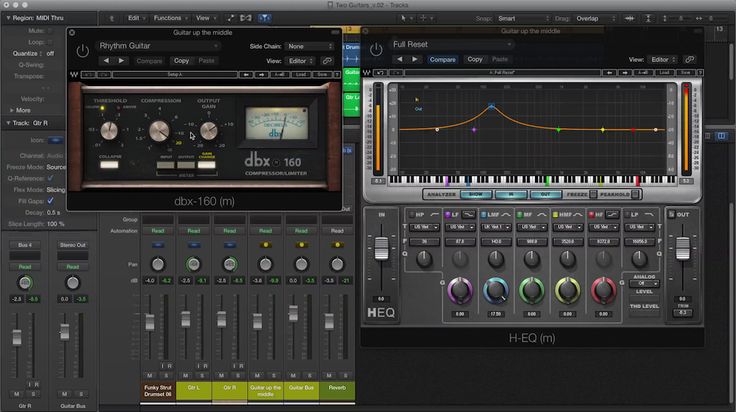
I love playing and composing music and I have released three albums over the years. I generally use Logic Pro X as my digital audio workstation, sprinkled with a few Waves plugins which I love (e.g. the H-Comp Hybrid Compressor, H-EQ Hybrid Equalizer, H-Reverb Hybrid Reverb, H-Delay Hybrid Delay, Bass Rider, Vocal Rider, L2 Ultramaximizer, Dorrough Stereo and WLM Plus Loudness Meter).

I find Waves plugins amazing. I tend to mainly use the ones created from scratch by Waves (like the one I have mentioned above) but I don’t mind using the ones modeled after classic hardware components from time to time (e.g. the API 2500, CLA-2A/3A/76 Compressor / Limiter and the SSL E/G-Channel).

Here are the various waves bundles (collections of plugins) with a list of plugins comprising them:

Silver Bundle ($599)

  • C1 Compressor
  • DeEsser
  • Doubler
  • Enigma
  • IR-L Convolution Reverb
  • L1 Ultramaximizer
  • MaxxBass
  • MondoMod
  • PAZ Analyzer
  • Q10 Equalizer
  • Renaissance Axx
  • Renaissance Compressor
  • Renaissance Equalizer
  • S1 Stereo Imager
  • SuperTap
  • TrueVerb

Gold Bundle ($799)

All the plugins in the Silver bundle with the following added:

  • AudioTrack
  • C4 Multiband Compressor
  • Doppler
  • Eddie Kramer Drum Channel
  • Electric Grand 80 Piano
  • eMo F2 Filter
  • eMo Generator
  • eMo Q4 Equalizer
  • GTR3 Amps
  • GTR3 Stomps
  • GTR3 ToolRack
  • GTR3 Tuner
  • H-Comp Hybrid Compressor
  • H-Delay Hybrid Delay
  • MetaFlanger
  • MV2
  • PS22 Stereo Maker
  • Renaissance Reverb
  • Sibilance
  • UltraPitch
  • V-Comp
  • V-EQ3
  • V-EQ4
  • Vitamin Sonic Enhancer
  • VU Meter
  • Waves Tune LT

Platinum Bundle ($1999)

All the plugins in the Gold bundle with the following added:

  • Greg Wells ToneCentric
  • L2 Ultramaximizer
  • L3 Ultramaximizer
  • L3-LL Ultramaximizer
  • Linear Phase EQ
  • Linear Phase Multiband Compressor
  • MaxxVolume
  • MetaFilter
  • OneKnob Driver
  • OneKnob Pumper
  • PuigTec EQs
  • Renaissance Bass
  • Renaissance Channel
  • Renaissance DeEsser
  • Renaissance Vox

Diamond Bundle ($2999)

All the plugins in the Platinum bundle with the following added:

  • Center
  • Cobalt Saphira
  • L3 Multimaximizer
  • L3-LL Multimaximizer
  • Morphoder
  • NLS Non-Linear Summer
  • OneKnob Filter
  • Q-Clone
  • SoundShifter
  • Trans-X
  • WLM Plus Loudness Meter
  • X-Click
  • X-Crackle
  • X-Hum
  • X-Noise
  • Z-Noise

Mercury Bundle ($7599)

All the plugins in the Diamond bundle with the following added:

  • Aphex Vintage Aural Exciter
  • API 2500
  • API 550
  • API 560
  • Bass Rider
  • Berzerk Distortion
  • Brauer Motion
  • BSS DPR-402
  • Butch Vig Vocals
  • C360 Surround Compressor
  • C6 Multiband Compressor
  • CLA Bass
  • CLA Drums
  • CLA Effects
  • CLA Guitars
  • CLA MixDown
  • CLA MixHub
  • CLA Unplugged
  • CLA Vocals
  • CLA-2A Compressor / Limiter
  • CLA-3A Compressor / Limiter
  • CLA-76 Compressor / Limiter
  • Codex Wavetable Synth
  • dbx® 160 Compressor / Limiter
  • DeBreath
  • Dorrough Stereo
  • Dorrough Surround
  • Eddie Kramer Bass Channel
  • Eddie Kramer Effects Channel
  • Eddie Kramer Guitar Channel
  • Eddie Kramer Vocal Channel
  • Element 2.0 Virtual Analog Synth
  • eMo D5 Dynamics
  • F6 Floating-Band Dynamic EQ
  • GEQ Graphic Equalizer
  • Greg Wells MixCentric
  • Greg Wells PianoCentric
  • Greg Wells VoiceCentric
  • H-EQ Hybrid Equalizer
  • H-Reverb Hybrid Reverb
  • IDR360 Bit Re-Quantizer
  • Infected Mushroom Pusher
  • InPhase
  • InPhase LT
  • IR-Live Convolution Reverb
  • IR1 Convolution Reverb
  • IR360 Convolution Reverb
  • JJP Bass
  • JJP Cymbals & Percussion
  • JJP Drums
  • JJP Guitars
  • JJP Strings & Keys
  • JJP Vocals
  • Kramer HLS Channel
  • Kramer Master Tape
  • Kramer PIE Compressor
  • L3-16 Multimaximizer
  • L360 Surround Limiter
  • LFE360 Low-Pass Filter
  • LoAir
  • M360 Surround Manager & Mixdown
  • Manny Marroquin Delay
  • Manny Marroquin Distortion
  • Manny Marroquin EQ
  • Manny Marroquin Reverb
  • Manny Marroquin Tone Shaper
  • Manny Marroquin Triple D
  • Maserati ACG
  • Maserati B72
  • Maserati DRM
  • Maserati GRP
  • Maserati GTi
  • Maserati HMX
  • Maserati VX1
  • MDMX Distortion Modules
  • MultiMod Rack
  • MV360
  • NS1 Noise Suppressor
  • OneKnob Brighter
  • OneKnob Louder
  • OneKnob Phatter
  • OneKnob Pressure
  • OneKnob Wetter
  • Playlist Rider
  • Primary Source Expander
  • PRS SuperModels
  • PuigChild Compressor
  • R360 Surround Reverb
  • S360 Surround Imager & Panner
  • Scheps 73
  • Scheps Omni Channel
  • Scheps Parallel Particles
  • Smack Attack
  • Sub Align
  • Submarine
  • Torque
  • UM225 / UM226
  • Vocal Rider
  • W43 Noise Reduction Plugin
  • Waves Tune
  • Waves Tune Real-Time
  • WNS Noise Suppressor
  • X-FDBK

Of course, if money is no object and you run a very profitable studio, get the Mercury Bundle. For mere mortals though, get a lower bundle or, maybe, buy the plugins you really need individually. For example, if I had to buy my favourite plugins individually, the amount I’ll have to pay would be:

  • H-Comp Hybrid Compressor ($179)
  • H-EQ Hybrid Equalizer ($179)
  • H-Reverb Hybrid Reverb ($349)
  • H-Delay Hybrid Delay ($179)
  • Bass Rider ($99)
  • Vocal Rider ($249)
  • L2 Ultramaximizer ($299)
  • Dorrough Stereo ($199)
  • WLM Plus Loudness Meter ($399)

for a total of $2131 which is more expensive than the Platinum Bundle! Maybe it would be more intelligent to wait for Waves to do sales (which they practically always do) or get the Platinum Bundle and try to make use of its plugins to the full.

In any case, have fun.

PS: Waves is not the only audio plugin manufacturer who offers quality plugins. Others do.

PPS: As a Logic Pro X user, I tend to use the Logic Compressor and the Logic Channel EQ more than their Waves counterparts (H-Comp Hybrid Compressor and H-EQ Hybrid Equalizer) because they integrate better in the Logic mixer. I would love to have the same kind of integration with the Waves plugins though. Waves? Apple?
Filed Under: Apple, Music, Technology

Preventing macOS from verifying LibreOffice and getting stuck

24 March 2017 By Avinash Meetoo 3 Comments

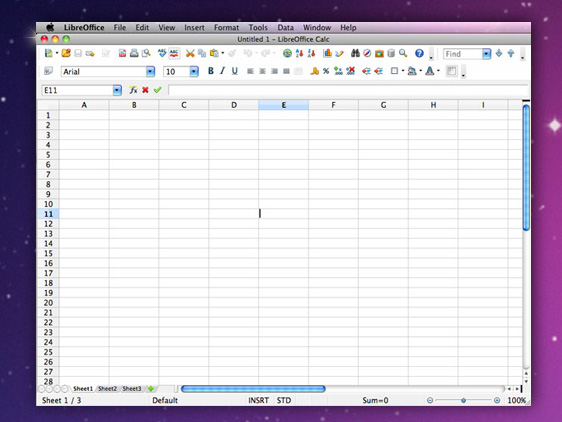
LibreOffice works really well on macOS. As well as in Linux and Windows. And this is a good thing for me as I can work on any computer and I am sure I’ll be able to read/write all my files.

I have noticed something on macOS. After installing a new version of LibreOffice and opening it for the first time, the OS will verify its integrity before actually launching it. But, for some reason, the verification sometimes gets stuck and LibreOffice never opens. The solution is simple:

xattr -d com.apple.quarantine /Applications/LibreOffice.app

Filed Under: Apple, Technology

My 20 essential Google Chrome extensions

17 March 2017 By Avinash Meetoo Leave a Comment

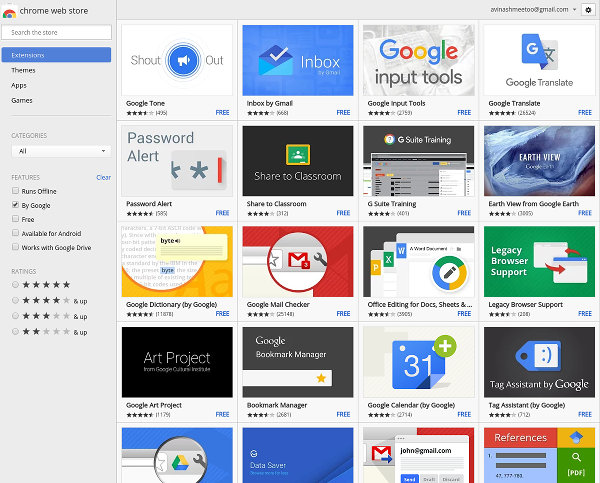
Google Chrome is the most popular web browser in the world. Built on Chromium, an open-source project, Chrome is now used by more than 60% of the billions of Internet users (compared to about 24% using a Microsoft browser, 12% using Firefox and 4% using Safari).

One of the reasons why Chrome is used so much is that it works extremely well with all the Google services we all depend on in these days: Gmail, Calendar, Drive, Docs, etc. Another important reason for its popularity is that Google Chrome is, well, practically an operating system (OS) which can be enhanced with extensions to make it do pretty much anything.

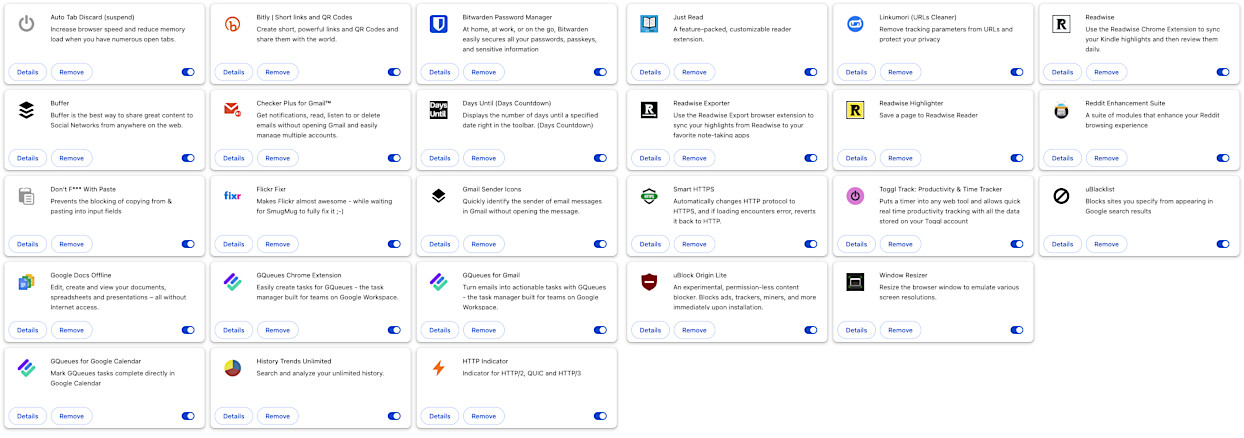
Here are the 20 Google Chrome extensions I would have some difficulty living without :

Productivity

GQueues Chrome Extension, GQueues for Gmail and GQueues for Google Calendar

I use GQueues to manage my tasks and to-do lists as it integrates very well with the Google ecosystem. The Chrome extension allows me to create a task very easily from anywhere while the GQueues for Gmail extension allows me to create a task in Gmail while reading a mail and both are then linked (i.e. the task needs to be done because of something read in the mail). Obviously, the Google Calendar extension integrates GQueues with Google Calendar.

Toggl Track

This extension puts a timer in Chrome and allows me to easily track the time I spend on various activities and making sure the data is safely stored in my Toggl account.

Pomodoro Timer

This simple yet powerful extension helps you stay focused, reduce procrastination, and achieve your goals through structured work and rest cycles.

Checker Plus for Gmail

I use four Google mail accounts and this extension notifies me whenever a mail comes. I can also reply, forward, mark as read, archive and delete easily. One great feature is that, whenever I find an interesting webpage, I can easily share it to others (my wife, Christina, most of the time) through the extension.

Gmail Sender Icons

This extension shows sender favicons for email messages. At a glance, I can see which emails are being sent, say, by Google to me or from Noulakaz members for the matter.

Bitwarden Password Manager

For many years, I have been using LastPass to manage my hundreds of passwords but I have replaced it with the Bitwarden Password Manager because the latter is open source software and has pretty much the same capabilities as LastPass (including two-factor authentication, managing passports with full encryption, autofilling login screens, generating new passwords, apps for Chrome and Android, etc).

BookmarkHub

BookmarkHub synchronises bookmarks between different browsers. It works with Chrome, Firefox, Edge and more. It uses a GitHub gist to store the browser bookmarks for security. The synchronisation is initiated manually and this is good because it prevents mistakes from happening.

Days Until (Days Countdown)

This simple extension displays the number of days until a specified date right in the toolbar. It is basically a number of days countdown. I use it to make me aware of the next big event coming. The first time I used it was when we were planning our Europe Tour in 2023.

Google Docs Offline

No network connection? No problem! With Google Docs Offline, you can access Google Docs, Sheets, Slides, and Drive without connecting to the Internet.

Learning / Sharing

Readwise

The Readwise extension syncs my Kindle and Instapaper highlights with the Readwise service which then allows me to review them daily. Readwise makes it easy to revisit the best parts of what I have read.

Readwise Highlighter

Readwise Reader has become the app which I use to read saved articles and highlight them. This extension can save articles to Reader and all highlights made will be synced with the Readwise ecosystem.

Readwise Exporter

The Readwise Exporter extension syncs all my Readwise highlights to note-taking apps such as Obsidian, Notion and Roam, the latter which I currently use. I now have in Obsidian all my Kindle and Instapaper highlights, thousands of them!

Archive Page

This is a simple one-click button to archive web pages on archive.today (or archive.ph), a time capsule for the internet. With a single click, I can ensure that important pages remain accessible, even if the originals are altered or removed. This extension makes the Internet more open.

Just Read

Web designers are sometimes crazy and create web pages which are basically impossible to read. This is also sometimes the case for old pages when CSS / styling was still in its infancy. Just Read changes the layout of the web page to someone much easier to read.

Artificial Intelligence (AI)

AI Exporter

An all-in-one AI chat management and export tool which exports ChatGPT, DeepSeek, Gemini, Grok chats to PDF, MarkDown, text or an image.

ChatGPT Timestamp

This is a simple extension which displays the date and time of ChatGPT messages in any conversation including all questions asked and replies made. The extension gets these dates and times from the conversation itself. The information is embedded but, for some reason, is not shown.

GoFullPage

This extension is a full page screen capture tool for any webpage. It capture a screenshot or a PDF of the current page in Chrome in its entirety and quite reliably. I use it to capture my chats in ChatGPT or Gemini for example and export everything in PDF format for archival.

Multimedia / Design

Flickr Fixr

I have been using Flickr since 2005 and I have more than 30,000 photos, hundreds of albums and, probably, thousands of tags in it. I intend to continue to use Flickr for at least a few additional years. This extension makes Flickr easier to navigate and use. Hopefully, the new owners of Flickr will revamp the UI soon so as to make this extension redundant.

Reddit Enhancement Suite

I am a big fan of Reddit and RES makes the website beautiful and adds a lot of new functionality to facilitate the life of power users.

Utility

Auto Tab Discard

This is a lightweight extension that suspends inactive tabs, helping to conserve RAM and battery life. Unlike the The Great Suspender extension which I used before, this extension uses the native method for discarding tabs, which means that even if the extension is removed or the browser crashes, the browser will automatically restore everything when launched again.

Don’t Fuck With Paste

Some websites disable paste and this pisses me off. I generally have very long and complex passwords which I manage with LastPass and the worst thing for me is a website which does not allow me to paste a password from LastPass. This extension takes care to make life sane again for me.

History Trends Unlimited

I spend a lot of time in Chrome and this plugin allows me to see which websites I have spent a lot of time on, on which day, at which hour, etc. It’s a very good statistics extension.

HTTP Indicator

HTTP was invented by Tim Berners-Lee in 1991 and since then new protocols have emerged, most notably HTTP/2 and HTTP/3 (QUIC). This extension graphically shows what protocol a web site is using and, while not essential for life, is interesting for geeks.

Smart HTTPS

HTTPS Everywhere works great but uses too much memory (hundreds of megabytes!). One of the reasons is that it includes a very large list of websites which respond to HTTPS (a whitelist basically) and, as you can imagine, this list is always growing in size. I have decided to replace it with Smart HTTPS which works differently but produces the same results. Whenever one goes on a website, Smart HTTPS tries to use HTTPS and, in case this does not work, falls back to HTTP. And it keeps a whitelist of only 50 entries (the 50 last websites visited which covers most of the websites one generally uses).

uBlacklist

Used to prevents sites I specify manually from appearing in Google Search results. I use Google Search extensively and, in the long run, I would like to get rid of all these dubious websites which only copy / steal content from elsewhere.

uBlock Origin Lite

This is a permission-less content blocker and, consequently, fully compatible with the latest incarnations of Google Chrome. It blocks ads, trackers, miners and more. Unlike its big brother, uBlock Origin, this lite version is Manifest V3-based.

Chrome Development Tools (DevTools)

This is not an extension as it is a standard part of Google Chrome but I had to mention it. DevTools, which I only use at 10% of what it can do, allows me to examine the DOM of the web page I am on, inspect the various elements, dynamically change CSS styling, remove frames and tags (e.g. ads) and execute Javascript snippets. It is an essential tool for web geeks.

Google Chrome is formidable. But the right combination of extensions has the potential to make it 10 times more formidable.

Try some and enjoy!

Update history

28 March 2017: Added uBlock Origin. Removed uMatrix.

12 August 2017: Added Smart HTTPS. Removed HTTPS Everywhere (it needs too much RAM).

14 August 2018: added Bitly, Gmail Quick Links, Gmail Sender Icons, Google Play Last.fm Scrobbler, Ink for Google and Just Not Sorry. Removed Google Keep extension, Context and Stylish.

20 March 2019: Added The Great Suspender. Removed StockBlocker and Postman.

30 April 2019: Removed Ink for Google (most of the Google services look good enough and I was having an issue with the font weight used for Gmail which prevented me from seeing which emails I had already read and which ones were unread).

31 May 2019: Added Bitwarden. Removed LastPass (I like open source software more).

6 April 2020: Added Google Docs Offline, Instapaper, Readwise and Window Resizer. Removed Desktop Notifications for Android. Also removed all descriptions of the extensions which I have stopped using and which were just struck out.

20 April 2020: Removed Just Not Sorry as it is buggy and prevents Gmail from working properly (paste is done twice and cannot send an email!). It was last updated on 14 February 2020. I really hope that the author will update it soon as, when it worked, I felt it was a fantastic extension that warns you when you write emails using words which undermine your message. For example, when you write “I think that it should be red”, the plugin urges you to write “It should be red”. It’s the plugin for alpha males :-)

4 July 2020: I have replaced History Trends (which stopped working with the latest Chrome) with History Trends Unlimited by the same author.

23 August 2020: Added cookies.txt, Redirect AMP to HTML, ClearURLs and Momentum as extensions. Also added a Multimedia / Design section.

23 September 2020: Added Readwise Exporter.

21 October 2020: Replaced HTTP/2 and SPDY indicator by HTTP Indicator. The reason is that the original extension has not been updated since 2016 and uses a deprecated API. The new extension is open source software.

4 February 2021: Replaced The Great Suspender by The Marvellous Suspender as it seems that the former now contains some kind of malware.

20 January 2022: I have stopped using Momentum, which is an extension which replaces the default new tab page with a personal dashboard featuring a beautiful photo, weather, quotes and a mantra because, well, since getting a 4K monitor, the photos had become less beautiful and, as a result, the page less inspiring… The replacement is simply the default Google page but with a landscape photo which changes every day. Of course, I lose the quote and the mantra but that’s fine.

20 March 2022: Removed Google Play Last.fm Scrobbler as Google Play Music is no more. Actually, I removed the extension some time back but I forgot to update this post. Added Flickr Fixr to make Flickr more powerful.

20 August 2022: Removed One Window as the extension does not exist anymore. This extension made sure that any new window or popup will result in just a new tab in the current window. I only used it sparingly as only a few websites open pop-ups now (looking at you MCB Internet Banking!). I have also removed cookies.txt which is an extension to export cookies for any domain into a legacy file format compatible with youtube-dl, wget, curl, aria2 and similar. I think I only used it once and it does not exist anymore. I have added uBlacklist which, in the long run, will allow me to get rid of all these dubious websites which only copy / steal content from elsewhere in Google Search results.

1 October 2022: Added Readwise Highlighter.

1 May 2023: Removed the Instapaper extension. I have moved to Readwise to save posts to read (and to highlight) later. Added the Days Until (Days Countdown) and the Disable Extensions Temporarily extensions.

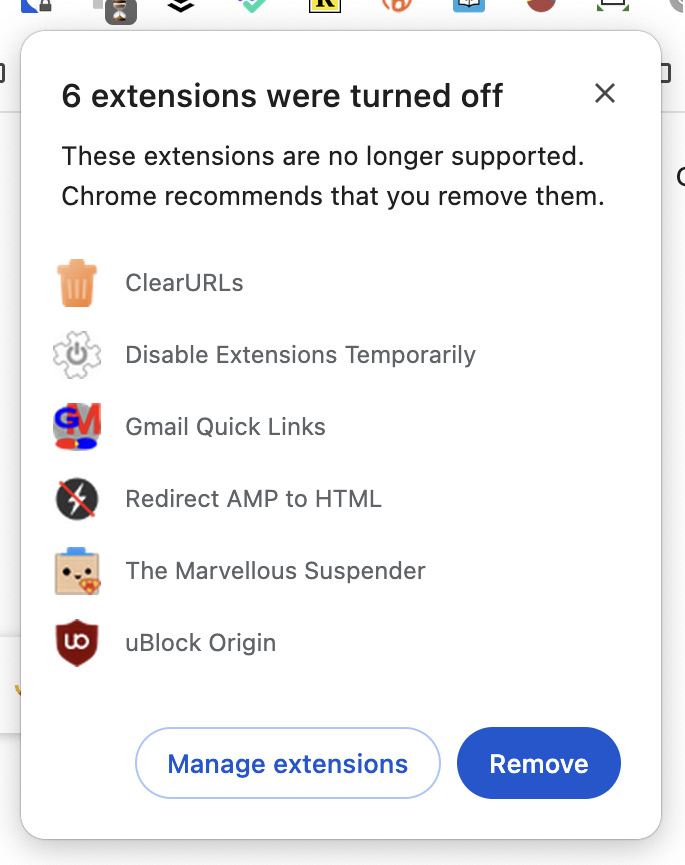
5 March 2025: Google Chrome now mandates that extensions comply with Manifest V3 which is the latest version of the extensions platform. A number of changes have been made to the available APIs and new features added. As a consequence, a number of extensions have stopped working, will soon stop working or will be removed from the Chrome store for extensions. Therefore, I have removed a few extensions which I do not use anymore as well as replace some by extensions which at Manifest V3-compatible.

I removed the Gmail Quick Links extension. I used it in the past to create labels to quickly see my unread emails or filter the emails in my inbox so that I can only see emails sent by others (as opposed to emails that I send to myself when I stumble upon something interesting). But the extension is deprecated now and it does not look that labels in Gmail work all the time.

I also removed Disable Extensions Temporarily as this feature is now part of Google Chrome, specifically through the use of Extensions Menu Access Control as explained here and here. Disabling extensions with one click is useful when troubleshooting a problematic extension or a networking issue.

I also removed Redirect AMP to HTML which automatically redirects any Accelerated Mobile Page (AMP) pages to their regular HTML equivalent. AMP is deprecated now and most websites are not using it anymore. Therefore, there is no real need for a plugin to do the redirect. If I ever need to bookmark an old AMP page, I’ll do the redirect myself :-)

After experimenting with uMatrix, I moved to uBlock Origin. It was a simple (mostly) fire-and-forget extension and it managed to block most of the ads and trackers on the websites I currently visited without degrading their usability. Unfortunately, uBlock Origin does not work properly in the latest versions of Chrome but, fortunately, uBlock Origin Lite works great as it is a Manifest V3 extension.

I replaced the ClearURLs extension, which automatically removes tracking elements (e.g. for Google and Amazon) from URLs to help protect privacy, by the equivalent Linkumori extension which is Manifest V3-compatible. I found out about that new extension when looking at the ClearURLs issues on Github.

The Marvellous Suspender is an extension which suspends tabs which are not being used, thus liberating much needed RAM. It also manages sessions which is useful when one has a lot of tabs open and needs to quit Chrome. Unfortunately, The Marvellous Suspender is not compatible with Manifest V3 and the author is sunsetting it while advising to move to the mostly equivalent Auto Tab Discard.

10 March 2025: I removed Window Resizer which resizes the browser’s window in order to emulate various resolutions. I don’t use it at all.

25 June 2025: I removed Linkumori which is an extension automatically cleans URLs by identifying and removing tracking parameters, thereby protecting privacy. Unfortunately, it was removing much more than (apparently) strictly required and a lot of links from emails I received stopped working.

3 October 2025: I added Archive Page which is a simple one-click button to archive web pages on archive.today (or archive.ph), a time capsule for the internet.

9 October 2025: I added ChatGPT Timestamp which is a simple extension to display the date and time of ChatGPT questions and answers.

12 December 2025: I added Toggl Track which tracks the time I spend on various activities, BookmarkHub which synchronises bookmarks between different browsers, AI Exporter which exports ChatGPT, DeepSeek, Gemini, Grok chats to PDF, MarkDown, text or an image and, finally, GoFullPage which is a a full page screen capture tool which I use it to capture my chats in ChatGPT or Gemini for archival.

27 February 2026: Added Pomodoro Timer which is an extension which provides with structured work and rest cycles.

23 March 2026: Removed Buffer which, previously, allowed me to share webpages automatically to Facebook, Twitter and LinkedIn at times where people are more likely to engage with them. I had been using Buffer since the Knowledge Seven days but, unfortunately, the service is severely limited now in terms of number of social media profiles. And I have also unpublished by Facebook professional page which I only created for Buffer as the latter cannot post on Facebook profiles.

I also removed Bitly which is a nice link shortening, analytics and optimisation service. I used Bitly systematically when sharing content to my social network profiles using Buffer. I didn’t use Bitly for anything else and, as I don’t have Buffer anymore, there is no reason to keep the Bitly extension.

In other words, I’m streamlining things.

[This post was created on 17 March 2017 and last updated on 23 March 2026]

Filed Under: Programming, Technology, Web

  • « Go to Previous Page
  • Page 1
  • Interim pages omitted …
  • Page 29
  • Page 30
  • Page 31
  • Page 32
  • Page 33
  • Interim pages omitted …
  • Page 139
  • Go to Next Page »

Primary Sidebar

Our Personal Websites

Avinash Meetoo
Christina Meetoo
Anya Meetoo
Kyan Meetoo

Archives

  • March 2026 (3)
  • January 2026 (2)
  • December 2025 (1)
  • November 2025 (1)
  • October 2025 (2)
  • September 2025 (1)
  • July 2025 (1)
  • June 2025 (1)
  • May 2025 (3)
  • April 2025 (4)
  • January 2025 (3)
  • December 2024 (2)
  • November 2024 (2)
  • October 2024 (3)
  • September 2024 (7)
  • August 2024 (1)
  • July 2024 (1)
  • June 2024 (2)
  • May 2024 (3)
  • January 2024 (2)
  • December 2023 (1)
  • October 2023 (1)
  • September 2023 (4)
  • August 2023 (3)
  • July 2023 (1)
  • June 2023 (4)
  • May 2023 (1)
  • April 2023 (1)
  • March 2023 (5)
  • February 2023 (1)
  • December 2022 (1)
  • November 2022 (1)
  • October 2022 (4)
  • August 2022 (4)
  • July 2022 (3)
  • June 2022 (5)
  • May 2022 (5)
  • January 2022 (3)
  • December 2021 (2)
  • November 2021 (1)
  • October 2021 (1)
  • September 2021 (4)
  • August 2021 (2)
  • July 2021 (14)
  • May 2021 (2)
  • April 2021 (4)
  • March 2021 (9)
  • February 2021 (2)
  • January 2021 (1)
  • October 2020 (1)
  • September 2020 (1)
  • August 2020 (2)
  • July 2020 (5)
  • June 2020 (3)
  • May 2020 (5)
  • April 2020 (6)
  • March 2020 (2)
  • February 2020 (2)
  • January 2020 (2)
  • October 2019 (1)
  • September 2019 (2)
  • July 2019 (2)
  • June 2019 (1)
  • May 2019 (3)
  • April 2019 (2)
  • March 2019 (1)
  • February 2019 (1)
  • January 2019 (3)
  • December 2018 (1)
  • October 2018 (3)
  • August 2018 (2)
  • July 2018 (2)
  • June 2018 (1)
  • May 2018 (2)
  • April 2018 (1)
  • February 2018 (1)
  • December 2017 (1)
  • October 2017 (1)
  • September 2017 (1)
  • August 2017 (1)
  • July 2017 (1)
  • May 2017 (4)
  • April 2017 (3)
  • March 2017 (4)
  • February 2017 (5)
  • January 2017 (3)
  • October 2016 (1)
  • September 2016 (1)
  • August 2016 (4)
  • July 2016 (1)
  • June 2016 (1)
  • March 2016 (3)
  • February 2016 (3)
  • January 2016 (1)
  • December 2015 (1)
  • November 2015 (2)
  • September 2015 (1)
  • August 2015 (3)
  • March 2015 (1)
  • December 2014 (1)
  • November 2014 (4)
  • October 2014 (1)
  • March 2014 (2)
  • February 2014 (3)
  • December 2013 (1)
  • October 2013 (1)
  • September 2013 (1)
  • August 2013 (1)
  • July 2013 (1)
  • June 2013 (2)
  • May 2013 (1)
  • March 2013 (3)
  • January 2013 (2)
  • December 2012 (3)
  • November 2012 (4)
  • September 2012 (3)
  • August 2012 (2)
  • July 2012 (3)
  • June 2012 (2)
  • May 2012 (1)
  • April 2012 (2)
  • February 2012 (1)
  • January 2012 (4)
  • December 2011 (2)
  • November 2011 (1)
  • October 2011 (4)
  • September 2011 (2)
  • August 2011 (1)
  • July 2011 (2)
  • June 2011 (4)
  • April 2011 (7)
  • March 2011 (2)
  • February 2011 (1)
  • January 2011 (3)
  • November 2010 (3)
  • October 2010 (1)
  • September 2010 (2)
  • August 2010 (4)
  • July 2010 (2)
  • June 2010 (1)
  • May 2010 (3)
  • April 2010 (4)
  • March 2010 (3)
  • February 2010 (3)
  • January 2010 (5)
  • December 2009 (2)
  • November 2009 (3)
  • October 2009 (1)
  • September 2009 (5)
  • August 2009 (3)
  • July 2009 (1)
  • June 2009 (3)
  • May 2009 (2)
  • April 2009 (7)
  • March 2009 (12)
  • February 2009 (10)
  • January 2009 (5)
  • December 2008 (4)
  • November 2008 (11)
  • October 2008 (6)
  • September 2008 (7)
  • August 2008 (3)
  • July 2008 (8)
  • June 2008 (6)
  • May 2008 (5)
  • April 2008 (7)
  • March 2008 (6)
  • February 2008 (3)
  • January 2008 (6)
  • December 2007 (11)
  • November 2007 (10)
  • October 2007 (7)
  • September 2007 (9)
  • August 2007 (3)
  • July 2007 (7)
  • June 2007 (8)
  • May 2007 (14)
  • April 2007 (11)
  • March 2007 (18)
  • February 2007 (14)
  • January 2007 (15)
  • December 2006 (16)
  • November 2006 (10)
  • October 2006 (7)
  • September 2006 (8)
  • August 2006 (8)
  • July 2006 (6)
  • June 2006 (4)
  • May 2006 (13)
  • April 2006 (10)
  • March 2006 (11)
  • February 2006 (7)
  • January 2006 (14)
  • December 2005 (8)
  • November 2005 (6)
  • October 2005 (7)
  • September 2005 (2)
  • August 2005 (6)
  • July 2005 (2)
  • June 2005 (6)
  • May 2005 (15)
  • April 2005 (12)
  • March 2005 (3)
  • February 2005 (8)
  • January 2005 (3)
  • December 2004 (1)
  • November 2004 (2)
  • October 2004 (2)
  • September 2004 (3)
  • August 2004 (3)
  • July 2004 (3)
  • June 2004 (3)
  • May 2004 (6)
  • April 2004 (10)
  • March 2004 (12)
Creative Commons License This work is licensed by Avinash Meetoo under a Creative Commons Attribution-NonCommercial-ShareAlike 4.0 Unported License.