
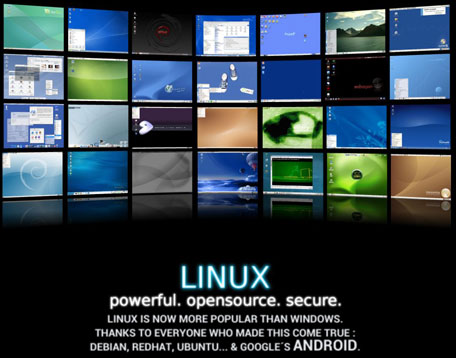
When I started using Linux in 2000, it was just 9 years old and practically no one knew about this strange operating system. Linus Torvalds, its creator, had as ambition to make Linux achieve world domination status. Of course, no one believed him.
Fast forward 13 years (i.e. 22 years after Linux’s birth) and something beautiful happens: Linux is now the most used operating system in the whole world thanks to Android which powers most smartphones and tablets and which is built on Linux. According to a Goldman Sachs’ private report, Android accounts for 41% of all computers on the planet, Apple MacOS X and iOS represent 23% and Windows only 20% (from its 95% of market share in 2004).
When Ubuntu Linux was created in August 2004, Mark Shuttleworth created bug report #1: “Liberation: Microsoft has a majority market share”. He has just closed the bug because, well, the bug is not a bug anymore as Microsoft software represents a minority now…
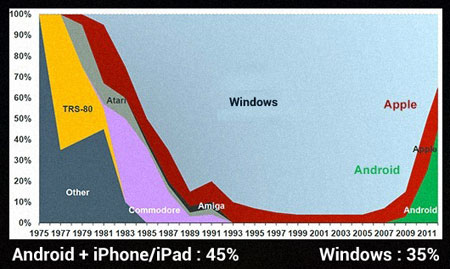
Interestingly, this makes sense. Until the beginning of the ’90s, the world of computing was very interesting: there were a lot of competing companies like Microsoft, Atari, Commodore, Apple, etc. and this fostered a lot of innovation and major advances were made. When Microsoft Windows became popular at the end of the ’90s, Microsoft crushed all their opponents by abusing their position of dominance and resorting to anti-competitive practices.
In 2007, something special happened: Apple released the iPhone. In the same year, Google announced Android, an operating system for smartphones and tablets, based on Linux, and released for free in 2008. Since then, major companies like Samsung, LG, HTC and Sony have adopted Android.
This means that we’re now mostly in the same situation as before Microsoft crushed its competitors. We now have three platforms, Android, Apple and Microsoft, and this can only mean that more innovation is to come. At the end, we, users, are the ones who are going to benefit more from this.
Laws couldn’t get Microsoft to behave. Linux, indirectly, has.
Yep :-)
Linux and BSD as well. I guess nobody counts the Juniper/cisco routers that power the whole internet. Juniper uses FreeBSD, and cisco uses both parts of FreeBSD and OpenBSD.
http://www.cisco.com/en/US/docs/cable/serv_exch/serv_control/broadband_app/rel38x/swcfg8000_gbe/AppendixC_license.html (Search for OpenBSD or Damien Miller).
JunOS: http://en.wikipedia.org/wiki/Junos
Apple also uses large amount of BSD code from FreeBSD, NetBSD, OpenBSD and even DragonflyBSD: https://twitter.com/eFrane/statuses/268090735729975296
Also, Android uses bsd’s libc instead of glibc :-)
//Logan
C-x-C-c
It is legitimately interesting to see the platform distribution numbers move up and down. Of course any market share comparison of >5 years automatically becomes a comparison between apples and oranges and walnuts.
Desktop vs Server used to be a compelling way to explain how Linux will continue to grow because there appeared to be a natural transition from Unix to Linux. But it didn’t quite play out like that. And Windows Server ended up exceeding expectations and went from ~1% distribution to >20% in just a few years. Now mobile appears to be the compelling way to show Microsoft being threatened from a different angle. Third, Microsoft anti-trust case was primarily about the browser wars. Microsoft not only survived while the Internet bubble bursting
I enjoy these kind of debates because it involves trying to over-simplify vast, complex ecosystems into an A vs. B competition. I can grok over-simplified arguments and they also make for good headlines, but they are, of course, too shallow to explain the true dynamics at work. They’re more comical than case study.
To predict the future market share breakdown of operating systems, you can’t use the public discourse that generates all of the media attention: platform purity, robustness & merit of feature set, freedom vs. greed, righteousness, loyalty and the most artificially persuasive emotion of them all: hatred..
Anyway, the problem I have with this post is that it perpetuates revisionist history explanations despite their lack of completeness and lack of truth. “When Microsoft Windows became popular at the end of the ’90s,” — this is not a true premise, as shown by the graph directly above this statement. “Microsoft crushed all their opponents by abusing their position of dominance and resorting to anti-competitive practices.” — this is an incredibly shallow and incomplete recollection of the times. First off Microsoft did not crush all of its opponents — certainly not when it comes to operating systems. Microsoft’s mission was to have a PC in every home and on every desk running Microsoft software. It was the success of this mission that open the door for thousands of companies to innovate, including Google & Apple. Second, Microsoft and Apple settled their court cases when Mac market share was at a very low level but the only profitable software running on the platform was Microsoft Office. So in a sense, the $100m Microsoft gave Apple helped allow them to survive long enough for Jobs to rework the company and allowed them to create the game changing iPod. It was Windows’ ubiquity that allowed Apple’s revenues to skyrocket without having to worry about selling a computer to the user first.
Laws couldn’t get Microsoft to behave? This is actually a silly argument, despite how much you hate Bill Gates or Windows. Yes, Linux has had a profound impact on the landscape of desktop and server operating systems. Did you know that Microsoft released Internet Explorer 3 for Solaris? Did you know that Microsoft continues to publish more of its code than nearly all other companies combined? Did you know that Apple sued the Polish supermarket A.pl for copyright infringement? Did you know that the majority of Ubuntu’s user interface standards are taken from the Windows published guidelines?
– What percentage of software developers only right software for Linux?
– How many companies have made a billion dollars because of Apple?
– How many users have saved thousands of dollars because of Linux?
Almost none is the answer to all 3 questions. Are you actually making the argument that Microsoft prevented innovation? That’s contrary to your statement that the iPod was revolutionary.
There are so many vectors of frustration tickled by Microsoft bashing that it’s hard to compose a coherent comment that is worth of further discussion. I’m exhausted already and I’m legitimately trying to stimulate conversation. However I fully realize that I am likely to fail. I am sorry about this. I still enjoyed reading your post.
Thanks for your interesting comment, Timmy.
I wrote a post 7 years ago on the point you’re mentioning. Check https://www.noulakaz.net/2006/04/28/thanks-microsoft-for-cheap-pcs/
I even wrote a poem on Bill Gates :-)
There are two observations I’ve made over the years : (1) Microsoft is less dangerous now than 10 years ago when they absolutely dominated everything and (2) Linux and open source software are not products, not even companies but, rather, a philosophy. Apples and oranges as you mentioned…