


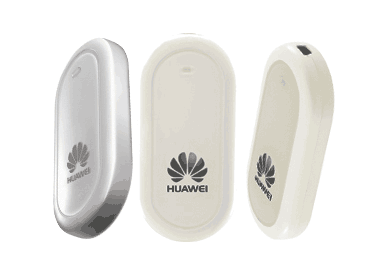
Emtel has recently started selling a USB modem (a Huawei E220) which uses its 3G cellular network (specifically HSDPA) to provide an Internet connection of up to 1.8Mbits/s.
A good friend of mine has bought one for his company but has not been able to make it work with Linux. Always looking for a new technical challenge (yes, I am a geek), I told him that I was willing to give it a try during the week-end. And this post is about what I did to make it work.
I run Kubuntu 7.10 (with kernel 2.6.22 which is > 2.6.19 which means that everything should normally work out of the box). Of course, this was mostly true in my case. Here is the exact version of Linux I’m using:
Linux noulakaz 2.6.22-14-generic #1 SMP Sun Oct 14 23:05:12 GMT 2007 i686 GNU/Linux
Plugging the Huawei E220 and typing dmesg, I get:
[ 112.528000] usb 2-1: new full speed USB device using uhci_hcd and address 2
[ 112.688000] usb 2-1: configuration #1 chosen from 1 choice
[ 112.796000] usbcore: registered new interface driver usbserial
[ 112.800000] /build/buildd/linux-source-2.6.22-2.6.22/drivers/usb/serial/usb-serial.c:
USB Serial support registered for generic
[ 112.800000] usbcore: registered new interface driver usbserial_generic
[ 112.800000] /build/buildd/linux-source-2.6.22-2.6.22/drivers/usb/serial/usb-serial.c:
USB Serial Driver core
[ 112.808000] /build/buildd/linux-source-2.6.22-2.6.22/drivers/usb/serial/usb-serial.c:
USB Serial support registered for GSM modem (1-port)
[ 112.812000] option 2-1:1.0: GSM modem (1-port) converter detected
[ 112.812000] usb 2-1: GSM modem (1-port) converter now attached to ttyUSB0
[ 112.812000] usbcore: registered new interface driver option
[ 112.812000] /build/buildd/linux-source-2.6.22-2.6.22/drivers/usb/serial/option.c:
USB Driver for GSM modems: v0.7.1
[ 112.824000] usbcore: registered new interface driver libusual
Of course, the important information here is:
GSM modem (1-port) converter now attached to ttyUSB0
In /dev, the following device is created automatically:
crw-rw—- 1 root dialout 188, 0 2007-12-16 10:24 ttyUSB0
BIG PROBLEM!
/dev/ttyUSB1 and /dev/ttyUSB2 do not exist meaning that the modem won’t respond. After searching, I found the solution online on Mohd Shakir Zakaria‘s weblog. The solution is to remove the uhci_hcd kernel module, reload it and wait for ttyUSB1 and ttyUSB2 to be created (this looks like a bug in uhci_hcd) [Thanks to Shakir who sent me a mail to tell me that uhci_hcd only has to be removed and reloaded once for the appropriate devices to be created…]
sudo modprobe -r uhci_hcd
sudo modprobe uhci_hcd
and the following is logged after some time:
[ 776.960000] option 2-1:1.0: GSM modem (1-port) converter detected
[ 776.960000] usb 2-1: GSM modem (1-port) converter now attached to ttyUSB0
[ 776.964000] option 2-1:1.1: GSM modem (1-port) converter detected
[ 776.964000] usb 2-1: GSM modem (1-port) converter now attached to ttyUSB1
[ 776.968000] option 2-1:1.2: GSM modem (1-port) converter detected
[ 776.968000] usb 2-1: GSM modem (1-port) converter now attached to ttyUSB2
There is a script which automates this process.
Connection to the Emtel network using wvdial is then trivial. This is my wvdial.conf:
[Dialer Emtel]
Phone = *99***1#
Modem = /dev/ttyUSB0
Username = user
Password = pass
ISDN = 0
New PPPD = yes
Baud = 1843200
Init2 = ATZ
Init3 = ATQ0 V1 E1 S0=0 &C1 &D2 +FCLASS=0
Modem Type = Analog Modem
Running:
sudo wvdial Emtel
produces:
WvDial<*1>: WvDial: Internet dialer version 1.56
WvModem<*1>: Cannot get information for serial port.
WvDial<*1>: Initializing modem.
WvDial<*1>: Sending: ATZ
WvDial Modem<*1>: ATZ
WvDial Modem<*1>: OK
WvDial<*1>: Sending: ATZ
WvDial Modem<*1>: ATZ
WvDial Modem<*1>: OK
WvDial<*1>: Sending: ATQ0 V1 E1 S0=0 &C1 &D2 +FCLASS=0
WvDial Modem<*1>: ATQ0 V1 E1 S0=0 &C1 &D2 +FCLASS=0
WvDial Modem<*1>: OK
WvDial<*1>: Modem initialized.
WvDial<*1>: Sending: ATDT*99***1#
WvDial<*1>: Waiting for carrier.
WvDial Modem<*1>: ATDT*99***1#
WvDial Modem<*1>: CONNECT
WvDial<*1>: Carrier detected. Waiting for prompt.
WvDial<Notice>: Don’t know what to do! Starting pppd and hoping for the best.
WvDial<Notice>: Starting pppd at Sun Dec 16 10:35:57 2007
WvDial<Notice>: Pid of pppd: 6193
WvDial<*1>: Using interface ppp0
WvDial<*1>: local IP address 10.11.80.28
WvDial<*1>: remote IP address 10.64.64.64
WvDial<*1>: primary DNS address 196.192.4.4
WvDial<*1>: secondary DNS address 213.200.89.89
I tested the Huawei E220 by downloading a couple of my own MP3s:
time wget https://www.noulakaz.net/avinash/music/so-logical/07-play.mp3
Length: 4,879,827 (4.7M)
real 2m5.443s
The download speed is 304 kbits/s
time wget https://www.noulakaz.net/avinash/music/so-logical/04-helium.mp3
Length: 4,276,087 (4.1M)
real 2m5.200s
Download speed is 267 kbits/s
And I also downloaded a 6Mb file from an official Ubuntu server:
time wget http://mu.archive.ubuntu.com/ubuntu/ls-lR.gz
Length: 6,000,019 (5.7M)
real 4m35.690s
Download speed is only 170 kbits/s which is nothing to shout about – but, at least, it works :-)
6 January 2007: an update
I’ve added sudo everywhere because I’ve realized that many Ubuntu (or Kubuntu) users do not know how to log in as root (which is excellent :-) ). I’ve also used dmesg command instead of having a look in the log files directly.
The Huawei E220 is a great mobile modem! I’ve brought mine to England to use for sending SMS from the office desktop.
As for the speed, I think that it was very decent given the sad state of Internet services in Mauritius.
— Eddy
Cool!
I think Emtel should pay you for this!
Is the coverage ok around the island?
Kailash
I also think the Huawei E220 is nice (and more so for laptop users on the move)
And, Kailash, I am 100% agreeable to that proposal :-) As for the coverage, I really don’t know. I have only tested it in Quatre-Bornes where I live.
Even i live in Q-b, am gonna test it & see if it works :) the speed sounds great, at home i have 1 méga, download speed it around 135kps
The Huawei E220 is commonly used by mobile carriers. One can find many documents easily on the web about how to get it running under Linux.
Commendable effort by Avinash, though.
— Eddy
Thanks for the info Avinesh. I’ve just arrived in Mauritius and want to use my friends USB Emtel device to connect to the net. He uses Windows XP and the Emtel works well.
I’ve just installed Ubuntu 7.10 on my laptop. It’s the first time I’ve used Linux so I am a real newbie. I plugged in the Emtel and the blue light flashed but Ubuntu did nothing. I looked at /var/log/dmesg but did not see the same logs that you show above. I also tried to run the script on Mohd’s website but I couldn’t figure out how to run a script on Ubuntu. Could you give me some tips on how I go about that?
Thanks a lot.
Hi Jake,
Welcome to Mauritius!
A script is just a text file. Just copy it somewhere. Run it with either:
sh name-of-script
or
sudo sh name-of-script
(sh is a the shell which is a command line interpreter. sudo is used if the script needs to be run with administrative rights (i.e. as root) like for Mohd’s script…)
Hi Jake,
I’ve slightly changed the commands to type. Pay special attention to the use of the sudo and dmesg commands.
hi avinash
i also use the Emtel E220 modem. I’am in the North at Grandbaie.
I dont get huge download speed. On the Software my Receive Top is 390kbps. But when downloading i only get 40KB/s.
I’am having slight confusion on your mentionned download speeds!!!!!!
Which is perfectly normal as 390 kilobits per second ~ 40 kilobytes per second (as 1 byte is 8 bits).
So nothing to worry about :-)
In fact, you have a quicker speed than what I have!
Anyone who can advise on the indoor coverage/reception of the network & modem? The speed is kind of slower indoor at times!
Also what will happen if many of my colleagues at office start making use of the same system? Being in the same office, will the modems share the air interface/bandwidth equivalent?
Hi,
I have been using the modem on my laptop running XP in Curepipe and Beau-Champs.
THe reception is very good…
how to use it under windows? i’ve installed but it doesn’t seem to connect :-(
Read the manual… and ask the Emtel guys.
Hi Avinash
Me too, i’ve the huawei hsdpa e220 modem, but don’t know how to install it on ubuntu 8.04. can you help me please with simple instructions. i’m new to ubuntu.
I have not tested the Huawei with 8.04 but try to follow the steps as described in my post above as from the “Connection to the Emtel network using wvdial is then trivial” part.
It this does not work then redo everything from the beginning of the post.
Good luck :-)
Hi Avinash
After lots of difficulties i’ve managed to install the Emtel e220. but now i’ve another problem. there’s no way for me to know how much i’ve downloaded and unploaded + i don’t know how to disconnect. I’m new to ubuntu. can you please tell with simple instructions how to do it.
Hi Raja,
If you open a console and type “sudo ifconfig”, you’ll see the ppp0 interface with a count of the number of bytes sent and received.
To disconnect, kill the pppd process. Open a console and type “sudo killall pppd”
Thanks. i’ll try it.
hi avinash,
i try the ‘ifconfig’ and the ‘sudo killall pppd’, it really works. but for the ifconfig, i can see how much i’ve downloaded and uploaded only for the current session. till now you’ve really been of help to me. can you please tell how to know how much i’ve downloaded and uploaded in all?
Check there…
hI am using this EMTEL modem for my as well (for remote working) and am likewise impressed.
The modem is recognised by ubuntu hardy heron 8.04 LTS, the ubuntu people seem to have packaged a “mobile connect” linux app.
top tip:
Attached it to a 9Bdi external panel ariel, a 5m cable and a coupling device then stick the ariel out the window and wave it around until your neighbours start staring hopefully you will find a good signal before they get too concerned. (I bought my ariel and coupler in the UK but I believe it is made by Poynting in South Africa, cost me about 100 pounds sterling).
I am getting about 1.3Mbps before 7am ish and same after 7pm, location is Phoenix. During the morning speed is gradually dropping to 100-200Kbps at mid day. Speed seems to drop to 30-70Kbps by about 3pm.
has anyone else encountered this drop in speed in the afternoon?
I suspect this drop in speed is due to saturation of the backbone cabel from Mauritius to Madagascar which I believe is onlg 1Gbps, but it could aslo be saturation of EMTELs network.
Hi avinash im nw from using Ubuntu and im want to used my emtel huawei modem so if u please explan me clearly how to install it properly n my laptop plz im now a pro of using linux but i saw that it was nice so i want to use it
thks in advanced
leeroy
cassis port louis
p.s plz reply on my addes ail to explain me plz
Hi Leeroy,
Read what I wrote above and you will manage to make the Huawei work with Linux :-)
Hi am using the Emtel USB modem since February and i can say its really fantastic! I get download speeds ranging from 40 kilobytes per sec to 45 kilobytes per second. Sometimes it even goes to 50 kilobytes per second ( a spike)! Once i downloaded a file of 100 MB in 50 mins approx!!
I have purchased the emtel hsdda about 1 year ago but i have not been able to use it at all on my desktop computers neither at home nor at work. It cannot connect: A connection to the remote computers cannot be establishe…
There is an Emtel tower about 300 m where i lives.When i bring it to the showroom for testing, it works perfectly in their laptops.
I use Windows XP
Anyone can suggest what the problem is?
Hi Kailash,
Good tutorial indeed.
BTW, is there a linux group in mauritius?
Regards,
Saurav
Update:
Orange will be launching their HSDPA service very soon, hopefully by December. I have been testing it with my Huawei E272 modem and have achieved great speed.
You guys can also test it using “orange” as APN
Enjoy
@shaad
I only managed to get a 512kbps (64KB/s) connection on the 3.5G….
@shaad
But it was with a mobile. :)
Sorry for the double comment Avinash! :P
Shaad,
How do we test Huawei E272 modem with orange? Is that moden lock with emtel? What are the settings that we need?
Thanks
jean
Why broadband is so poor in Mauritius although there is only very few the subscribers. Virgin Uk has just launched its 50Mbps service. Can anyone in the government work to have at least 2 Mbps for resident subscribers. Moi mo dire mette france telecom dehors et gouvernement upgrade ca network la. Getting 5MBps in Mauritius is still possible but no one wants to improve the quality at the higher level. Anyone who knows Dulull mette ca dans so lalete. faire li travail unpeu. Or does he want commission!!
Hi Ashish,
I guess that technically everything is possible. But will Mauritian subscribers be ready to pay? Don’t forget that Mauritius is thousands of km from Europe and the USA… and this is, according to me, why ADSL is so expensive here compared to the prices there…
Hi,
Will your settings work with a Ps3 with Yellow Dog 6.1 and that key selled by Emtel Mauritius? http://www.emtel-ltd.com/data.php?category=12
Thnaks for all!
I don’t know. Why don’t you try and tell us?
Because they sell their modem 5200 Rs. + VAT. It’s a bit expensive for a possibly non-working web solution.
I finally configured my Ps3 with Ubuntu Inprepid Ibex 8.10 and there’s some kind of configuration tool who can set up mobile network. There’s although a list of countries (mauritius included) and a list of provider, EMTEL is one of them.
I will maybe give it a try if my banking account allow it ;)
“BIG PROBLEM” lol…
Guillem is right, the modem costs around Rs5200+VAT. I do have a PDA with a built in HSDPA modem but emtel won’t offer the same internet services through SIM. HSDPA on modem v/s HSDPA on SIM has a huge price gap i guess.. For those who already have the modem, there should have been some ways to provide broadband services through handheld device with the same price scheme as the HUAEI modem but who cares…
Hello, can you tell me what’s the default wep key of the livebox orange?
And is it possible for two computers to connect to the same livebox via wi fi without a router? Thanks
Hello, can you tell me what’s the default wep key of the livebox orange?
And is it possible for two computers to connect to the same livebox via wi fi without a router? Thanks
(1) The default WEP is printed on the Livebox.
(2) Yes. Wifi is a shared medium.
Hello, i believe i saw you frequented my website thus i stumbled on “return the benefit”.